
Rhythm edits (beat markers)

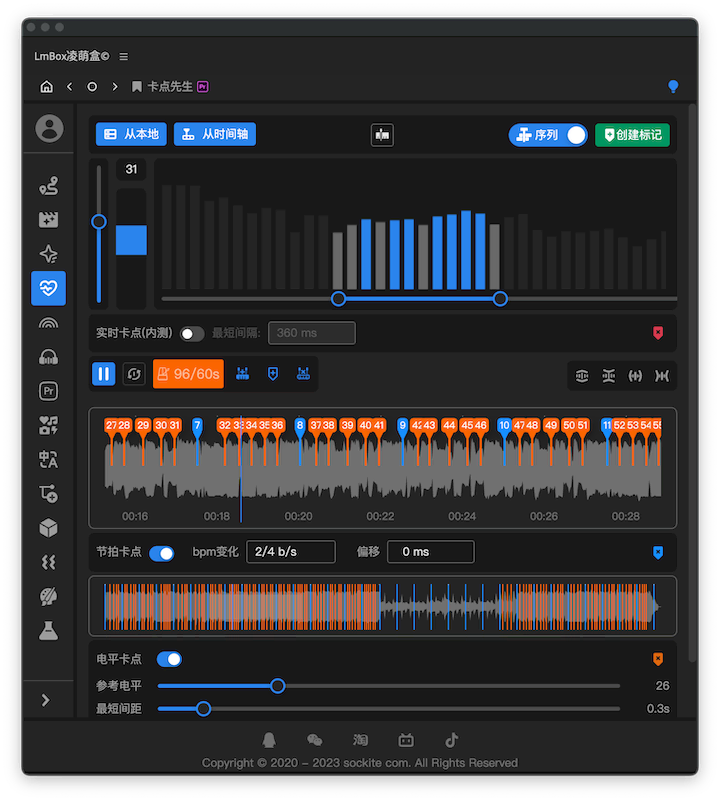

Feature overview
Detect beats and energy peaks on the timeline and write them as markers. In the LmBox desktop app, open it from the sidebar entry Rhythm edits.
Version notes
The desktop app (LmBox Tauri) already includes the first-phase features: beat markers + energy markers + writing markers to the timeline / clips. Live band-based markers and copying Fusion nodes will come in later versions.
How to open it
Open Rhythm edits from the LmBox sidebar (the Premiere or DaVinci Resolve extension must be connected).
Screen overview
- From timeline: select an audio clip on the timeline to load its waveform.
- Drop a file: drag audio or video from your computer onto the waveform area to replace the current waveform.
- Beat grid: detects the BPM automatically; adjust density and offset, and fix half-tempo / double-tempo detection.
- Energy marks: places marks by a loudness threshold; adjust the minimum gap.
- Write markers: write timeline markers or clip markers.
Workflow
- Connect the editing extension and get the audio from the timeline.
- Detect the beats, then adjust density and offset as needed.
- Turn on energy marks if you need them.
- Create the markers.
Video introduction
Video coming soon
Release notes
2.7.0Fixed choosing "write to clip" in Premiere still writing to the timeline, and copying timeline markers to a clip failing. Markers now land on the clip correctly.2.7.0Fixed the energy stems feature only showing a message when the transcoding tool is missing. It now opens the external tools in Settings.2.0.0Added Rhythm edits to the sidebar: get audio from the timeline, detect beats and energy peaks automatically, and write timeline or clip markers.