
Art student's palette

Four in the afternoon, and the studio is always at its loudest. Someone is washing brushes, someone is tearing tape to mount a board. The junior by the window had a paint box that was always cleaner than anyone's, while my titanium white always ran out first, and it seemed I had gotten used to borrowing hers. Each time she smiled and did not look up. Later we each went our own way, and the sentence I never finished stayed on the windowsill of that year.
Now when you open this slot, it is not a digital color wheel and not a separate window. Click the slot and that box of paints is spread out again at the bottom of the floating toolbar: watercolor, gouache and oil in their own boxes. Only later did I learn to use the eyedropper to steal a little color from the screen and put it in "Picked". The plate still has its beige plastic base, which shows through when you wipe it, just like back then.
What you will learn
- Fill the watercolor / gouache / oil slots in settings, or apply a common preset
- Dip color from the box at the bottom, mix it on the plate, thin it with water and wipe the plate with the towel
- Pick color from the screen with the eyedropper; the color goes into the "Picked" box
Where to find it
- Open in the sidebar
- Drag Art student's palette into an empty slot
- Click the slot in the main window: fill cells, change the row count and apply presets at the bottom right
- Click the slot on the floating toolbar: the current box and the palette unfold at the bottom; click again to fold
The boxes are empty by default. To use a ready-made set of colors, click Preset in settings yourself, like opening that box of Marie paints once more.
TIP
After you change a box in the main window, reopen the box at the bottom once to use the new cells. A box that is already unfolded does not jump cell by cell with the settings.
Settings at the bottom right: four boxes
The segmented control at the top switches between Water / Gouache / Oil / Picked. You fill the first three yourself; the Picked box is written by the eyedropper and does not take presets.
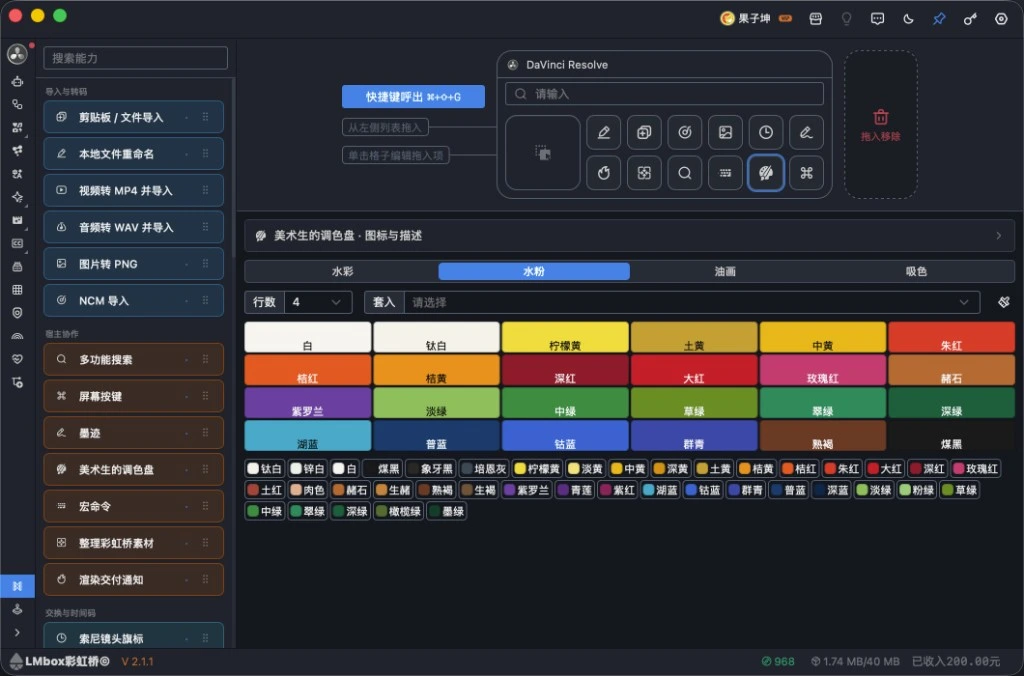
Figure: click the slot in the main window: the gouache box with Marie 24 colors applied. Titanium white, ultramarine and burnt umber are still where they were. The screenshot shows the Chinese interface.
| Item | Description |
|---|---|
| Rows | How many rows the current box has (6 cells per row) |
| Preset | Fill the current box with a common set, such as Marie gouache 24, Watercolor 18 or Oil 12 |
| Color cells | Click a cell, then click a paint name below to fill it; click a filled cell again to clear it |
| Swatch beside the selected cell | Fine-tune the color of this cell |
| Rag icon | Clear the box (only the one you are editing) |
Paints are named the way studios call them: titanium white, ultramarine, burnt umber. Whichever cell you click, it feels like flipping through that old catalog stuck together with paint.
Use it on the floating toolbar
From left to right, the bottom roughly holds:
| Area | What it does |
|---|---|
| Box switch | Water / Gouache / Oil / Picked |
| Color cells | Press and hold a filled cell; the longer you press the more you dip |
| Palette | Sweep and mix on the plate; you can also press and hold on the plate to dip the brush |
| Dot at the lower left of the plate | Change the plate's base color (the beige plastic kind that shows when you wipe) |
| Water | Add a little water to only thin the color on the brush, without mixing in white |
| Towel | Wipe the plate |
| Eyedropper | Pick a color from the screen; it goes into the Picked box |
| Color strip at the right of the plate | Colors already mixed on the plate, which you can dip again |
The color on the brush shows near the water bucket. For a thicker or thinner stroke, click the dots above the bucket to switch among three sizes.
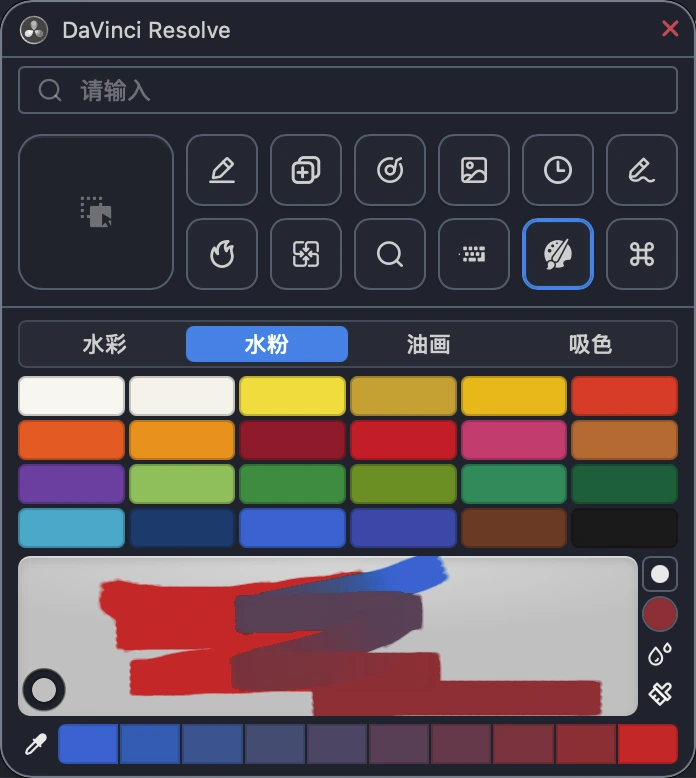
Figure: the paint box laid out under the bar, with paint already mixed on the plate. When red meets ultramarine, you remember whose plate was always cleaner than yours. The screenshot shows the Chinese interface.
This version does not write colors into the editing app's color picker. Mixing happens inside the Toolkit, like quietly carrying the studio with you; only that sentence is still unsaid.
Works with
All Toolkit hosts.
Not supported for now
There is no separate palette window and no master switch in settings. Harmony relations and writing colors back to the host are for later.
FAQ
Q: Nothing at the bottom when opened?
A: The boxes are empty by default. Click the slot in the main window, fill some cells or apply a preset, then reopen the box at the bottom.
Q: The Picked box says it is full?
A: Clear the cells you do not need before reducing rows, or clear the Picked box and pick again.
Q: I changed settings but the unfolded plate is still the old one?
A: Fold it and unfold the box at the bottom again. An unfolded box does not sync with settings in real time.