
Grab timeline stills

Select video clips on the timeline, tick the moments you want to capture, then choose a folder, and the monitor frames are saved as images in order. Good for storyboards, dialogue checks, or handing marker frames to someone else.
What you will learn
- Drag "Grab timeline stills" into an empty Toolkit slot
- Tick the sources at the bottom of the floating toolbar and export
- Batch-save frames by clip start, end, middle or marker
Where to find it
- Open in the sidebar
- Drag Grab timeline stills into an empty slot
- Click the slot in the main window: tick sources and export at the bottom right
- Click the slot on the floating toolbar: the same ticks unfold at the bottom; click Export
Use it on the floating toolbar
First select video on the timeline (in After Effects, select layers that have an image), then tick the moments to capture. You can click refresh to see the count first, then click Export and choose a folder.
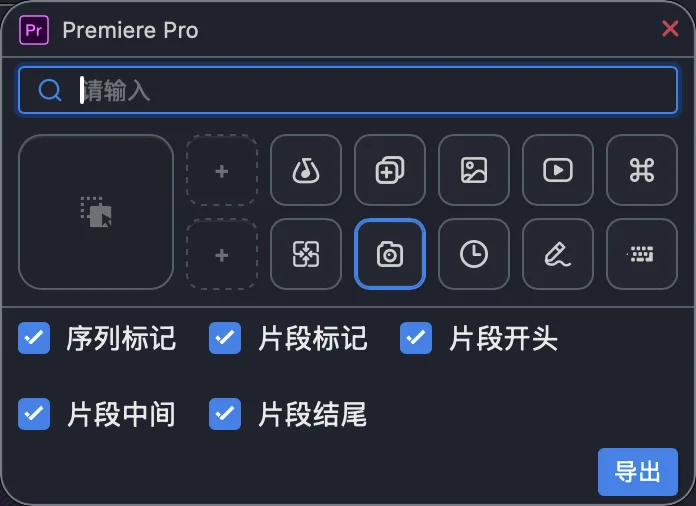
Figure: click the camera slot on the floating toolbar: tick sources and click Export. The screenshot shows the Chinese interface.
What it can do
| Source | Description |
|---|---|
| Clip start / end | The frame before a clip's in / out point on the timeline |
| Clip middle | The midpoint between in and out |
| Sequence markers | Markers on the current timeline |
| Clip markers | Markers on the selected clips, aligned by timeline position |
It only handles the video selected on the timeline (in After Effects, layers that have an image). If nothing is selected, clip-based sources produce no images, while sequence / composition markers can still be exported. If your DaVinci Resolve version cannot read the selection, it uses the video clip under the playhead instead.
It works with Premiere, After Effects and DaVinci Resolve. In After Effects, "Sequence markers" means composition markers and "Clip" means the selected layers. The format DaVinci Resolve writes follows the project's still settings, most often JPG.
Further reading
Release notes
2.9.0Capturing timeline frames is steadier on older Premiere versions, and failures are explained more clearly.2.1.2Added "Grab timeline stills": tick clip start, end or markers to batch-save timeline frames to a folder; available in Premiere, After Effects and DaVinci Resolve.